Storage and System Updates
The reference layout pairs boot, operating-system, and application slots for image-based updates. A shared data filesystem keeps configuration and runtime state across those slot changes.
Partition Layout
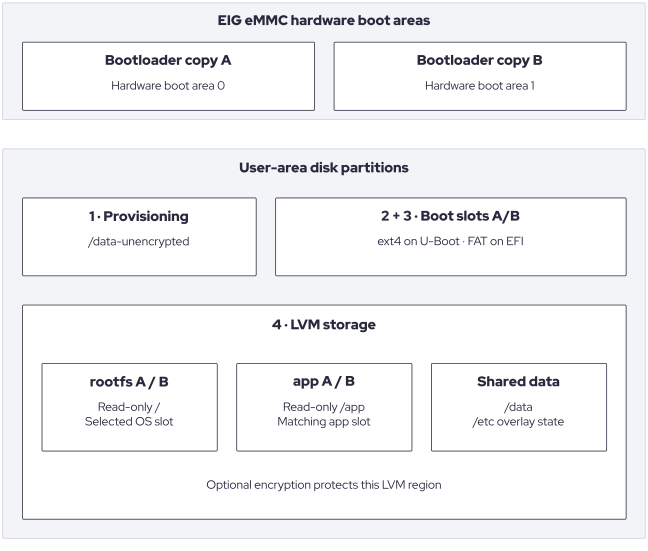
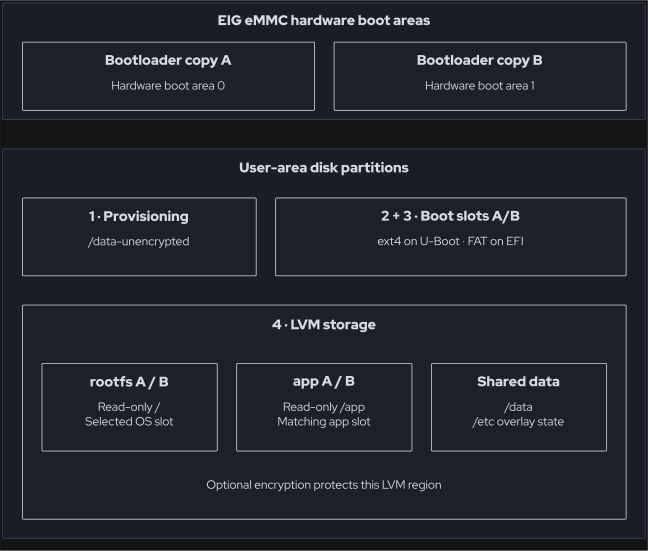
Reference rootfs-on-LVM layout. EIG eMMC boot areas are outside the WIC user-area partition table; virtual disks have no eMMC hardware boot areas. Optional encrypted storage protects the LVM region.
orcos-lvm-layout.inc supplies common LVM policy. With RAUC selected,
orchestraos-image-rauc.inc chooses a WIC template from the rootfs setting
and bootloader backend:
Configuration |
WIC template |
Rootfs and boot slots |
|---|---|---|
Rootfs on LVM, U-Boot |
|
LVM rootfs A/B; physical ext4 boot A/B. |
Rootfs on LVM, EFI |
|
LVM rootfs A/B; physical FAT boot A/B, both EFI system partitions. |
Rootfs on physical partitions |
|
Physical ext4 rootfs A/B containing the boot files. LVM holds application A/B and data. |
ORCOS_ROOTFS_ON_LVM defaults to 1 in the common distribution policy.
Initramfs creates or activates the volume group before mounting an LVM rootfs.
In the physical-rootfs layout, storage services activate application/data LVM
later. The crypt layer requires rootfs on LVM and does not support the
physical-rootfs layout; see Extended Security.
The four physical partitions are:
Partition |
Rootfs-on-LVM layout |
Physical-rootfs layout |
|---|---|---|
1 |
|
|
2 |
|
|
3 |
|
|
4 |
LVM physical volume for rootfs A/B, app A/B, and data. |
LVM physical volume for app A/B and data. |
On EIG hardware, the two eMMC hardware boot areas contain the redundant bootloader copies. They are outside the user-area WIC partition table. RPMB is also outside that table and is not populated by these WIC templates. QEMU’s firmware is supplied separately; its virtual disk has no eMMC boot areas.
Volume |
Size policy |
Update behavior |
|---|---|---|
|
|
Written as part of the selected RAUC slot group. |
|
|
Written as part of the selected RAUC slot group. |
|
Remaining free volume-group extents. |
Persistent; not a payload slot in the reference RAUC bundle. |
Disk Naming
The disk is described by ORCOS_DISK_DEVICE_NAME and
ORCOS_DISK_PART_PREFIX. EIG defaults derive from EMMC_DEV and use the
p separator, for example /dev/mmcblk2p4. QEMU sets the disk name to
vda and the separator to the empty string, producing /dev/vda4.
ORCOS_DISK_DEVICE, ORCOS_DISK_PART, and the configured partition indices
are then used by provisioning, mount, and RAUC templates.
Changing disk naming is a platform integration decision: disk layout, firmware boot commands, and slot paths must agree. It does not make every physical storage interface a supported boot target.
Capacity and Growth
The misc reference configuration sets ROOTFS_PART_SIZE = "2048",
APP_PART_SIZE = "1024", and BOOT_PART_SIZE = "1024", in MiB per slot.
UNENCRYPTED_PART_SIZE defaults to 32 MiB. The initial LVM partition defaults
to 4096 MiB; the QEMU fragment overrides it to 6144 MiB.
The initial WIC LVM partition is a provisioning container, not a promise of usable space for all logical volumes at that size. Early boot grows the final partition to the target disk before creating the logical volumes. Two 2048 MiB rootfs slots and two 1024 MiB application slots alone require 6144 MiB inside LVM, before metadata and the persistent data filesystem. The disk must also hold both boot partitions and the unencrypted partition. Allow additional space for persistent data, filesystem overhead, and image growth. The QEMU installation example uses a 16 GiB disk.
Persistent /etc Overlay
The minimal and Weston image recipes enable read-only-rootfs and add
overlayfs-etc when ORCOS_ROOTFS_ON_LVM is enabled, which is the default.
This supplies a writable /etc while retaining the image’s read-only rootfs
policy. The physical-rootfs reference configuration does not enable this
overlay.
The common distro configuration selects an ext4 backing filesystem on
/dev/mapper/${VG_LVM_LABEL}-${DATA_PART_LABEL}, mounted at /data.
The OpenEmbedded overlayfs-etc class installs a pre-init wrapper at
/sbin/init and preserves the original init as /sbin/init.orig.
The wrapper mounts the data filesystem and the merged /etc before starting
systemd.
Layer |
Location |
Purpose |
|---|---|---|
Lower |
|
Default configuration supplied by that image. |
Upper |
|
Persistent files added or changed through the merged |
Work |
|
Working directory used by OverlayFS on the same data filesystem. |
Read and edit configuration through /etc. Files without an upper-layer
override come from the currently selected rootfs. Modified files override the
image defaults, and deletion records continue to hide the corresponding lower
files. The upper layer is shared by both slots and survives rootfs updates and
rollback; it is not replaced by a RAUC bundle.
The supplied overlay class does not migrate or reset configuration when the image changes. Review persistent configuration for compatibility in both update and rollback directions: an existing override can hide a new image default, and a service migration can affect configuration compatibility during rollback.
To inspect the mounts on a running device:
awk '$2 == "/etc" || $2 == "/data" { print $2, $3, $4 }' /proc/mounts
/etc should be an overlay mount using the upper and work directories
above, and /data should be the persistent ext4 filesystem. The supplied
pre-init template logs mount failures and continues to start init, so service
startup alone does not confirm that writable configuration is persistent.
File System Contents
Path |
Purpose and lifetime |
|---|---|
|
Persistent LVM filesystem shared by both rootfs slots; holds writable configuration and service state across rootfs updates. |
|
Merged configuration view in rootfs-on-LVM images; see Persistent /etc Overlay. |
|
Persistent upper layer and working directory for the |
|
Docker daemon data and the persistent target of |
|
RAUC persistent update state. |
|
Directory created for the configured OrchestraOS user. |
|
Provisioning markers and, when encryption is selected, protected key material or derivation metadata needed before the encrypted LVM opens. |
|
Application logical volume corresponding to the selected rootfs slot. |
|
Boot filesystem corresponding to the selected slot. |
|
User home installed by the image. Its presence does not give it the same persistence policy as the data logical volume. |
|
Volatile journal cursor database; recreated after reboot. |
Application layers define any additional platform integration state.
RAUC Update Flow
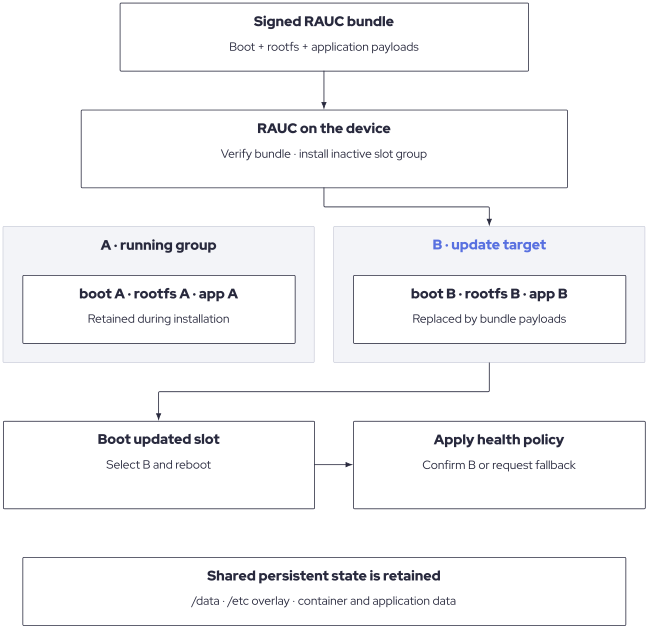
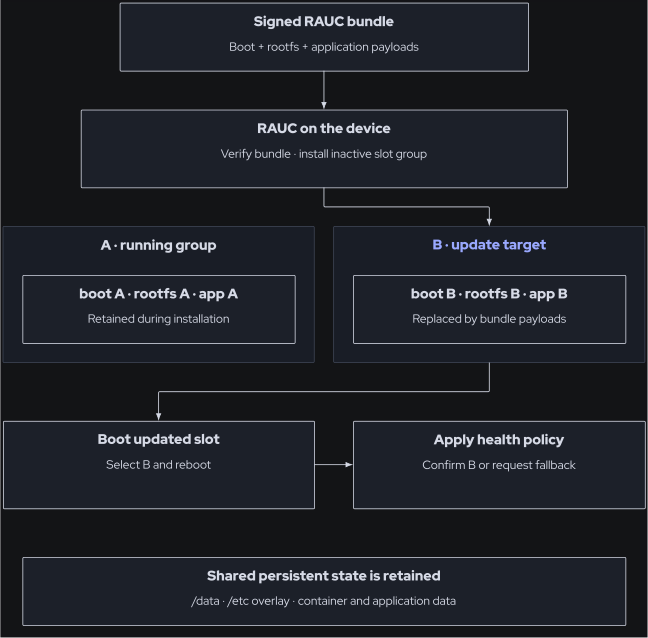
On-device update flow, illustrated with A running and B as the update target. Bootloader payload inclusion and fallback behaviour depend on the configured target and backend.
Adding rauc to DISTRO_FEATURES selects the RAUC image integration.
The reference RAUC bundle format is verity and its filename extension is
.raucb.
Setting |
U-Boot / EIG reference |
QEMU UEFI reference |
|---|---|---|
|
|
|
|
|
|
|
|
|
Boot selection state |
U-Boot environment, including slot order and retry counts. |
EFI entries and firmware variables maintained with |
The bundle includes a bootloader payload only when
RAUC_BOOTLOADER_ON_DISK is enabled, a boot-filesystem payload when
ROOTFS_ON_LVM is true, and rootfs/application payloads. Boot payloads are
named boot.ext4 or boot.vfat; rootfs and application payloads are
rootfs.ext4 and appfs.ext4. For EIG platforms, bootloader selection
accounts for the signing state and available U-Boot memory variants.
ROOTFS_ON_LVM is true when either ORCOS_ROOTFS_ON_LVM or
INITRAMFS_IMAGE_BUNDLE is true. This deliberately supports a separate
initramfs, including EIGXS AHAB packaging. LVM rootfs slots use
/dev/mapper/${VG_LVM_LABEL}-${ROOTFS_SLOT_*_LABEL}; physical-rootfs slots
use the configured disk partitions. Application slots use LVM in both cases.
The rootfs and application slots are grouped under the corresponding boot
slot in the rootfs-on-LVM configuration. Runtime services include RAUC,
rauc-hawkbit-updater, its OrchestraOS configuration, and a version reporter.
RAUC stores persistent update state under /data/rauc. Delivery endpoint and
credentials are deployment configuration; the presence of an updater does not
establish a connection to an update server.
Slot Health and Persistent State
Application health policy must decide when a newly booted slot is acceptable
and arrange the appropriate RAUC good/bad decision. Installing a bundle does
not demonstrate that the application is healthy. Persistent data and the
/etc overlay also need compatibility review when planning rollback.
The boot retry and slot-selection mechanisms are described in Boot and Provisioning.