Base Software and Applications
OrchestraOS uses a Yocto-built Linux userspace and systemd for service startup and supervision. Applications can run in containers or execute directly on the target. Their persistent state belongs on the shared data filesystem.
Software Baseline
The following values describe the Scarthgap software baseline documented here. Record the selected manifest, layer revisions, and package inventory for each built image.
Component |
Reference version |
Selection and scope |
|---|---|---|
Yocto series |
Scarthgap |
Declared by |
EIG kernel |
|
Compulab and ASUS board support is applied as patches and machine defconfigs. |
EIG U-Boot |
2024.04 |
|
BusyBox |
1.36.1 |
Supplied by the pinned Poky metadata. |
systemd |
255.22 |
Supplied by the pinned Poky metadata. |
GCC |
13.5.0 |
Supplied by the pinned Poky metadata; target tuning is machine-specific. |
NetworkManager |
1.52.0 |
Supplied by this layer with iwd and dhcpcd configuration. |
Fluent Bit |
5.0.5 |
Log collection and forwarding, including a TPM2-provider integration patch. |
Telegraf |
1.38.4 |
Metrics agent, built with the Go recipes supplied by this layer. |
Go |
1.26.8 |
Native bootstrap, cross toolchain, runtime, and SDK recipes are kept in the same version family. |
QEMU uses the kernel and firmware selected by its own machine configuration; the EIG kernel and U-Boot version rows do not describe the UEFI virtual target. See Supported Hardware and Virtual Platforms.
Native Applications
Native applications execute directly on the target using its Linux kernel, libraries, and device interfaces. Add them through a project layer and build them for the target architecture. A long-running application can provide a systemd unit defining its service account, dependencies, and restart policy; installing a binary alone does not start a service.
The reference demo-app recipe in meta-orchestraos-misc compiles a C
application and installs it as /app/usr/bin/demo-app. This demonstrates
the application filesystem as a home for target binaries. The selected
application volume is mounted read-only at /app and follows its matching
rootfs slot. Applications may also be packaged in the rootfs when their
lifecycle belongs to the base OS.
Keep binaries, libraries, and service units compatible within each release.
Write application data beneath /data; the /app image is replaced
during an application-slot update. Services that execute from /app must
order their startup after that filesystem is available. See
Storage and System Updates for slot contents and persistence.
Container Applications
The base image includes Docker Moby and Docker Compose. Containers share the host Linux kernel and run application-specific userspace images. systemd supervises the Docker daemon; Docker manages the containers and their configured restart behaviour. Project configuration supplies workload images, Compose definitions, network settings, and access to required devices.
Container image delivery and restart policy are separate from RAUC
operating-system updates. Docker stores its images, writable layers, and
volumes under persistent /data/docker. A rootfs slot change therefore
retains this state; deployment policy must account for application and
persistent-data compatibility when rolling the OS back.
Docker Runtime Policy
OrchestraOS uses docker-moby as the Docker provider and installs
docker-compose in the base image. The Docker service is enabled by default
through a systemd wants symlink.
Docker runtime state is intentionally moved out of the root filesystem:
Docker daemon data root is configured as
/data/docker./root/.dockeris a symlink to/data/.docker.The daemon configuration is installed as
/etc/docker/daemon.json.
The Docker recipe installs the daemon configuration during the image build.
Because Docker state lives under /data, it is preserved across rootfs
updates and follows the encryption policy of the data LVM volume when encrypted
storage is enabled.
Service, Access, and Network Policy
See Orchestra Manager Platform Integration for the device-side requirements for integration with the Orchestra Manager Platform: enrollment, credentials, management access, network connectivity, telemetry, container operations, and system updates.
Image and Layer Composition
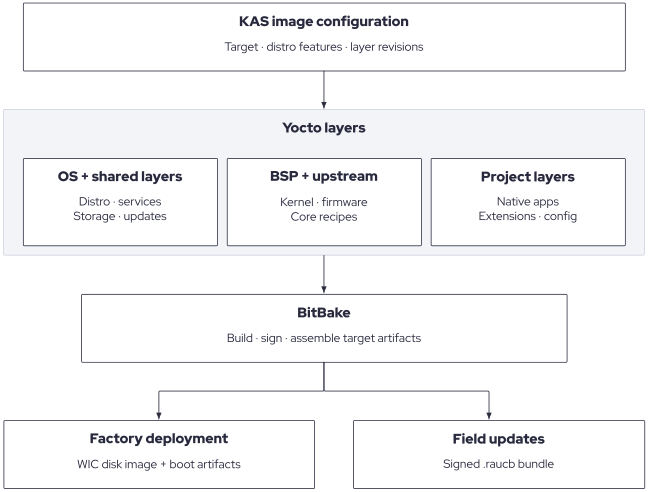
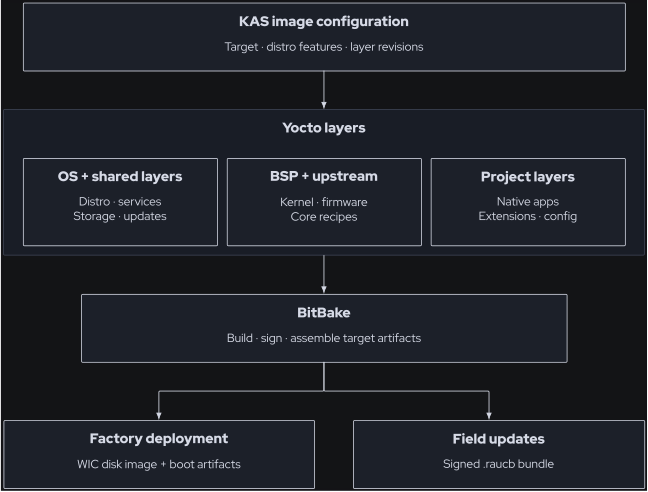
Build composition for the reference RAUC image. The selected layers define the software and target support; the resulting disk image and update bundle serve different stages of the device lifecycle.
KAS manifests select the target, distribution features, and layer revisions. BitBake combines core OS policy, board support, shared and upstream recipes, and any project or extension layers. The minimal and Weston image recipes share the base OS policy; Weston adds the graphical environment.
The reference RAUC composition emits a factory WIC image and a signed
.raucb field-update bundle, alongside target-specific boot artifacts.
Factory deployment and the first-boot population procedure are described
in First-Boot Provisioning; later updates follow RAUC Update Flow.